
MySQL has the inbuilt query rewritten plugin for rewrite the SQL statements which received by the server before execute them .
- Before MySQL 8.0.12 , the query rewritten plugin only supports for SELECT’s
- From MySQL 8.0.12 , the query rewritten plugin will supports for INSERT , REPLACE, UPDATE, DELETE , SELECT .
One of our customer had the performance issue with the DELETE statements for particular table . The issue was happened after the new code deployment . In this blog, I am going to explain the implementation of the MySQL query rewrite plugin and how we overcome the issue using the MySQL query rewritten plugin .
MySQL Query rewritten plugin Implementation :
MySQL provides two SQL files for the installation / Uninstallation purpose . The files will be located under the directory “lc_messages_dir”

- The file install_rewriter.sql for the installation purpose .
- The file uninstall_rewriter.sql for the uninstallation purpose .
Once you loaded the file “install_rewriter.sql” , it will create a separate database / table / procedure for the query rewritten rules management .

database : query_rewrite
table : rewrite_rules
procedure : flush_rewrite_rules
Table structure :

- The SQL rewritten rules needs to be configured on the table “rewrite_rules” .
- Based on the query rules the server will rewrite the query .
- All the columns have their own purpose .
Example :
Here is the simple example with query rewritten plugin .

pattern : SELECT ?
replacement : SELECT ? + 1
Hope this make sense !!
Note : It is always need to call the procedure “flush_rewrite_rules” . whenever you modified the rules table .
My problem statement with DELETE :
- Last Friday One of our client had the new code deployment .
- With the new code they mistakenly mentioned the UPPER function on one of the DELETE statement , actually which is not required .
- So, the query was not able to use the INDEX as the function prevents the INDEX usage .
- The table had around 30M records
- Unfortunately modifying the code without UPPER case is not possible that time .
Fix : We have provided the fix by using the MySQL query rewritten plugin by adding the rules without the UPPER function .
It is restricted to share the production data , so I have reproduced the same issue at my local environment with less data .
Experiment at my local :
Created the table “jc_rewritten” and inserted some records .

DELETE with UPPER function ,
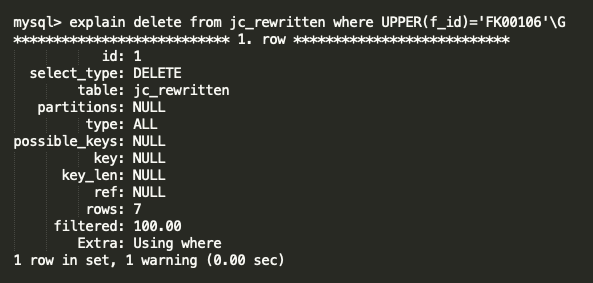
Here you can see the UPPER function is blocking the index for column “f_id” and the query doing FTS ( Full Table Scan ) . It is very painful for 30M table .
DELETE without UPPER function ,
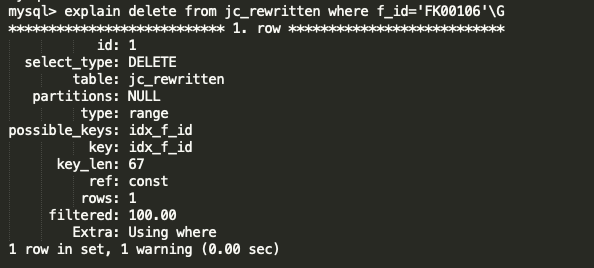
Without UPPER function, the query is using the optimal index and does direct look up . It is very very fast .
Both the query will affect the same data ,

So, we have made the Query rewritten rule like below ,
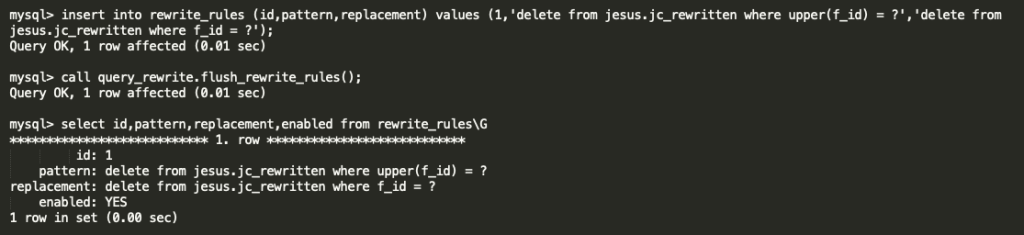
just we are removing the UPPER function as it is not required .
After activated the query rule the SQL is running fine as expected . And, our performance issue was fixed .

You can see the warning message as how the server changed the query . Below is the logs from GENERAL query log ,

Conclusion :
Some of the database tools ( i.e. ProxySQL ) have more features on this Query rewritten topic . MySQL inbuilt query rewritten plugin recently ( from MySQL 8.0.12 ) supporting for DELETE’s , UPDATE’s , INSERT’s . And, it helps a lot to solve our production issue . Expecting more features on upcoming versions . Special Thanks to MySQL community Team !! I will be come up with my next blog as much as possible .
Thanks !!
 Sakthi's MySQL Blog