
In this blog, I am going to explain the complete process involved in the MySQL group replication setup using SSL. The blog covers the complete MySQL config files as well as steps. I used the following aspects for my testing purpose.
- MySQL 9.3.0 Inn ovation release
- Ubuntu 24.10
- 3 physical servers
I also enabled the hostname based authentications between the three VMs. So that, I don’t need to provide the IPs explicitly each time. To achieve this, I used to update the the file “/etc/hosts” with following entries.
root@gr1:~# cat /etc/hosts | grep gr
198.19.249.194 gr1 gr1
198.19.249.116 gr2 gr2
198.19.249.163 gr3 gr3

---- Test
root@gr1:~# telnet gr2 3306
Trying 198.19.249.116...
Connected to gr2.
---- Works!
Creating SSL certificates:
As I am going to setting up the SSL based group replication, I need to create the required certificates first, before enabling the configurations. We usually have the certificates available inside the MySQL data directory, we can use it. At anycase, if you do not see the ssl certs use the following approach to create certificates manually.
mkdir -p /var/lib/ssl   #Use any directory
cd /var/lib/ssl
Execute the following commands inside “/var/lib/ssl/”
openssl genrsa 2048 > ca-key.pem
openssl req -new -x509 -nodes -days 365000 -key ca-key.pem -out ca.pem
openssl req -newkey rsa:2048 -days 365000 -nodes -keyout server-key.pem -out server-req.pem
openssl rsa -in server-key.pem -out server-key.pem
openssl x509 -req -in server-req.pem -days 365000 -CA ca.pem -CAkey ca-key.pem -set_serial 01 -out server-cert.pem

chown -R mysql:mysql /var/lib/ssl
Verify the files and permissions.
root@gr1:/var/lib/ssl# ls -lrth
total 20K
-rw-r--r-- 1 mysql mysql 1.7K May 5 01:16 ca-key.pem
-rw-r--r-- 1 mysql mysql 1.3K May 5 01:16 ca.pem
-rw-r--r-- 1 mysql mysql 956 May 5 01:16 server-req.pem
-rw------- 1 mysql mysql 1.7K May 5 01:17 server-key.pem
-rw-r--r-- 1 mysql mysql 1.2K May 5 01:17 server-cert.pem
root@gr1:/var/lib/ssl# openssl verify -CAfile ca.pem server-cert.pem
server-cert.pem: OKGR and SSL configurations for “my.cnf” :
To setup the group replication, binary logs and gtid mode are mandatory configurations. Server id should be unique. Additionally, to enable the SSL based group replication, we need to enable the parameter “group_replication_ssl_mode=REQUIRED”. You can refer the complete set of configuration below.
[mysqld]

# Basic settings
server-id=1000
log_replica_updates=ON
gtid_mode=ON
enforce-gtid-consistency=ON

# Enable Group Replication
plugin-load='group_replication.so'
group_replication_group_name="c94ccc00-e72b-496c-a32f-ce656c5c9de1"
group_replication_start_on_boot=OFF
group_replication_local_address="gr1:33061"
group_replication_group_seeds="gr1:33061,gr2:33061,gr3:33061"
group_replication_single_primary_mode=ON
group_replication_enforce_update_everywhere_checks=OFF
group_replication_ip_allowlist="gr1,gr2,gr3"
group_replication_recovery_get_public_key=1

# SSL settings
ssl-ca=/var/lib/ssl/ca.pem
ssl-cert=/var/lib/ssl/server-cert.pem
ssl-key=/var/lib/ssl/server-key.pem
group_replication_ssl_mode=REQUIRED
group_replication_recovery_ssl_ca=/var/lib/ssl/ca.pem
group_replication_recovery_ssl_cert=/var/lib/ssl/server-cert.pem
group_replication_recovery_ssl_key=/var/lib/ssl/server-key.pem
The above configs are taken from “gr1” node. You can use the same config for the other nodes as well. But, make sure to change the server_id value as well as “group_replication_local_address”. Apart from that all the other settings can be used.
Also, make sure you did the MySQL restart after applying the config.
Note: For group replication, no need to keep the same SSL certificates between the server. GR can authenticate and works with the different certificates. But, this is not the case for Galera cluster. We need to keep the same certs on all nodes.
Creating the user with REQUIRE SSL privilege:
For the SSL based setup, the user should be created with “REQUIRE SSL” privilege and the certain other privileges are needed. Please check the following commands for the reference. It is recommended to disable the binary logs before creating the user.
SET sql_log_bin=0;
CREATE USER 'grepl'@'%' IDENTIFIED BY 'GRepl@321' REQUIRE SSL;
GRANT REPLICATION SLAVE,CONNECTION_ADMIN,BACKUP_ADMIN,GROUP_REPLICATION_STREAM ON . TO 'grepl'@'%';
FLUSH PRIVILEGES;
SET sql_log_bin=1;
Make sure the above statements should be executed on all the three nodes individually.
Bootstrapping the cluster:
Now, we are done with most of the steps, next step is need to start the group replication. I am using the single primary setup ( group_replication_single_primary_mode=ON ). So, I can bootstrap anyone of the node then, I can add the other two nodes as a secondary.
Bootstrapping “gr1” as a primary,

commands:
set global group_replication_bootstrap_group=on;
start group_replication user='grepl',password='GRepl@321';
set global group_replication_bootstrap_group=off;
SELECT * FROM performance_schema.replication_group_members;
On “gr2” and “gr3”,
start group replication;Final status,
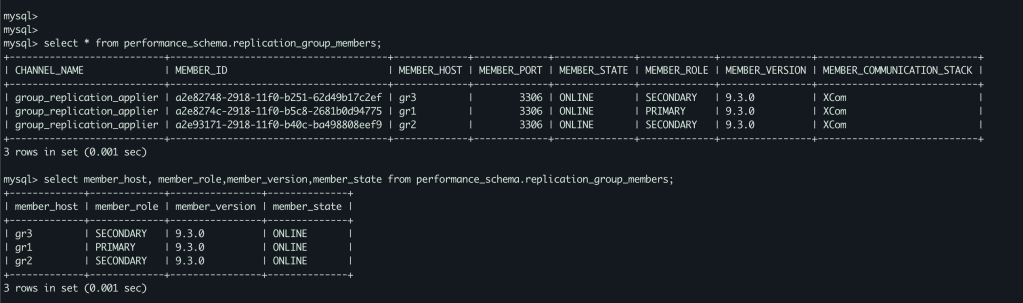
As you see the above screenshot, all the nodes are joined and part of the GR cluster. We have one primary component ( gr1 ) other twos (gr2,gr3) are secondary.
Conclusion:
I hope you enjoyed this write up. Please share your thoughts in comment section or reach me directly on my LinkedIN or Gmail. I have the plan to create more topics in Group replication, please suggest your ideas. Looking forward to hear from you.
LinkedIN
email: hercules7sakthi@gmail.com
Whatsapp: +919008208584
 Sakthi's MySQL Blog